How to Move the BrightArrow Icon in the Navigation Panel
By default, the BrightArrow icon / charm is located near the top of the navigation panel in PowerSchool, but if you want to move it closer to the bottom of the panel you can do that through the BrightArrow Settings.
If you're doing this from District Office, see here.
If you're doing this from a school, see here.
Moving the BrightArrow Charm in District Office
If you're in District Office, you can move the BrightArrow charm from the top portion of the left navigation panel to put it near the bottom of the panel.
- Navigate to System Management > Data > BrightArrow Settings
- On the BrightArrow Settings page, click the tiny arrow above "Staff Contacts" to open Additional Admin Options
- In the BrightChat column, use the drop-down boxes for the district and/or school to move the Charm Location accordingly.
- Default: Charm is located near the top of the navigation panel, under Attendance
- Other option: "Above Applications" will move the charm closer to the bottom of the navigation panel, above Applications
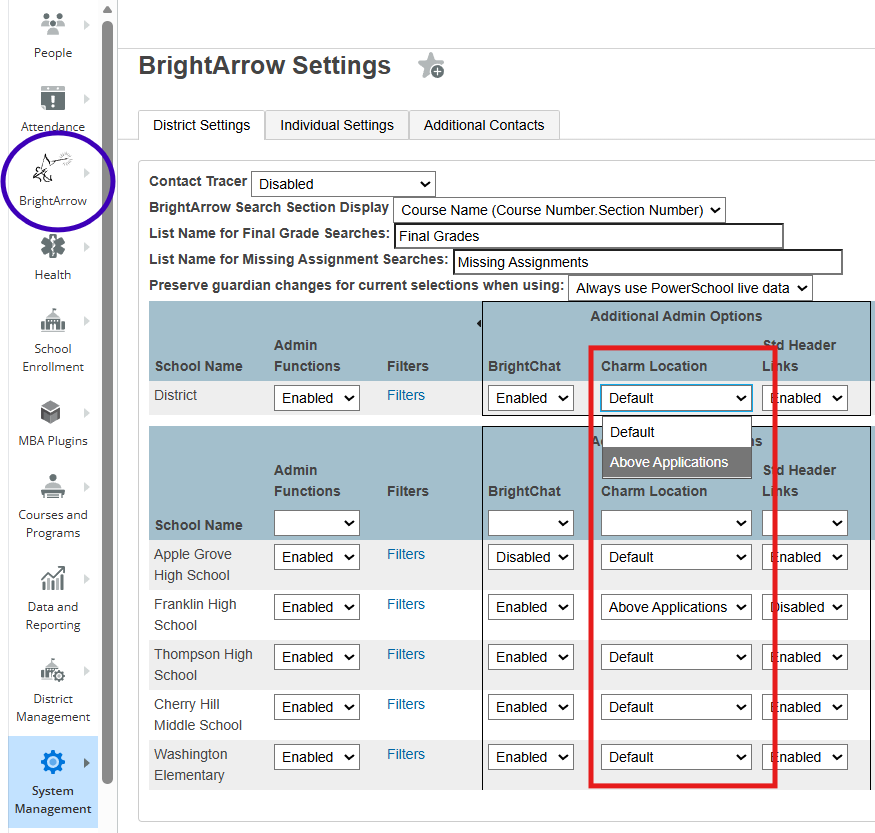
- When you're finished making changes on the page, click the Submit button at the bottom of the page to save them.
- The charm is now moved to the location you selected


Moving the BrightArrow Charm at the school level
If you're logged in to your individual school, you can move the BrightArrow charm from the top portion of the left navigation panel to put it near the bottom of the panel.
- Navigate to System Management > Data > BrightArrow Settings
- On the BrightArrow Settings page, click the drop-down in the Charm Location row
- Default: Charm is located near the top of the navigation panel, under Attendance
- Other option: "Above Applications" will move the charm closer to the bottom of the navigation panel, above Applications
- When you're finished making changes on the page, click the Submit button at the bottom of the page to save them.
- The charm is now moved to the location you selected


